
AI talk is full of words people nod along to. Tokens. Context windows. RAG. Hallucination. If you’ve ever nodded and hoped nobody would ask you to explain, this site is for you.
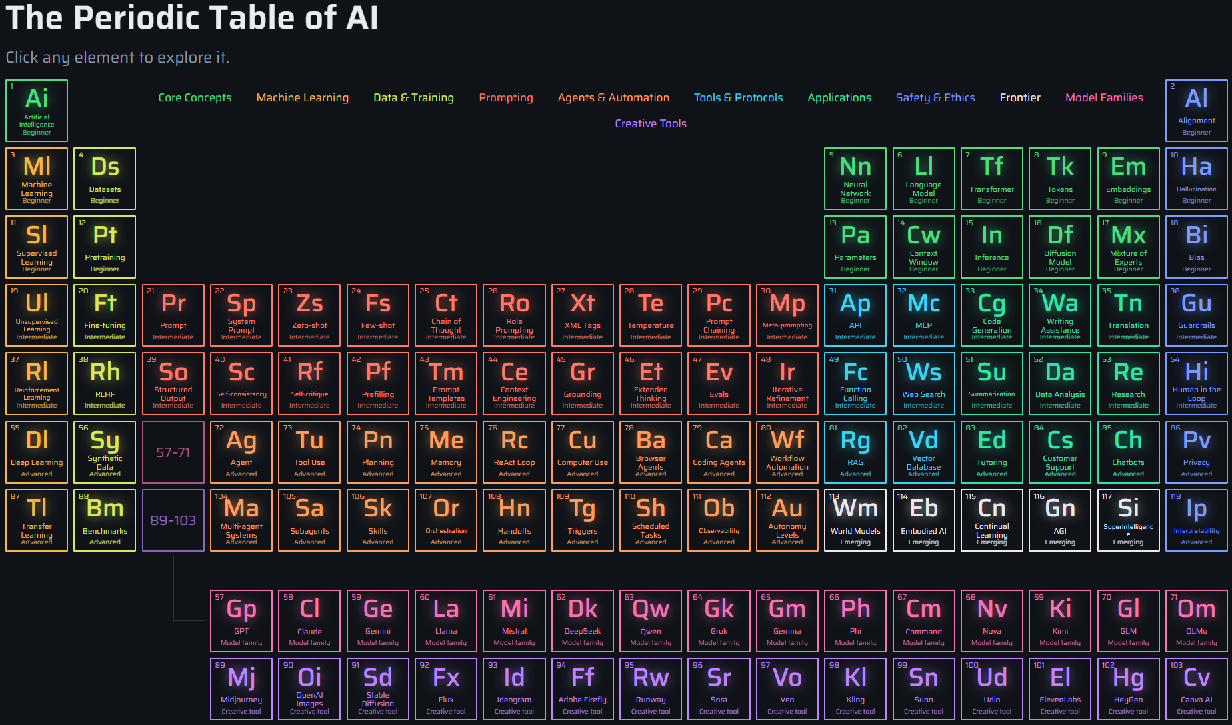
Aiodic is the periodic table of AI. It has 118 elements, the same number as the real periodic table, and each one is a single idea, tool, or model. Click an element and you get a page that explains it in plain English.
Why a periodic table?
The real periodic table is a map. Nobody memorizes it. You look up the element you need, and you can see what sits next to it and how it fits in with the rest.
That’s the idea here. Artificial Intelligence sits in the top-left corner, right where hydrogen sits on the real table. Alignment sits in the top-right corner. Everything else is color-coded by group, so you can see at a glance which ideas belong together.
The real table also pulls two rows out and parks them underneath, marked 57–71 and 89–103. Aiodic does the same thing. Those two rows hold the Model Families (GPT, Claude, Gemini, Llama and more) and the Creative Tools (image, video, music and voice tools).
How to use it
Go to the home page and click any tile. Each tile shows a number, a short symbol, the name, and a difficulty label:
- Beginner: start here if AI is new to you.
- Intermediate: ideas that make more sense once you know the basics.
- Advanced: the deeper stuff, for when you’re curious or building something.
- Emerging: ideas that are still taking shape, like AGI and world models.
You don’t need to go in order. Pick whatever you’ve been hearing about and look it up.
What’s on every element page
Every page follows the same plan, so once you’ve read one, you know how to read them all:
- What it is: the plain-English explanation.
- Why it matters: what changes for you because of it.
- Real-world examples: where you’ve probably already run into it.
- Try it yourself: a short activity you can do in a few minutes.
- Common mistakes and misunderstandings: what people get wrong.
- Related elements: where to go next.
The 11 groups
The colors on the chart mark the groups:
- Core Concepts: the basic ideas, like neural networks, tokens and transformers.
- Machine Learning: the main ways machines learn.
- Data & Training: how models get fed, tuned and tested.
- Prompting: how you talk to a model to get better answers.
- Agents & Automation: AI that takes actions and works through tasks on its own.
- Tools & Protocols: how AI connects to other software.
- Applications: what people actually use AI for.
- Safety & Ethics: the problems and the guardrails, from bias to privacy.
- Frontier: ideas at the edge of the field.
- Model Families: the big names in AI models.
- Creative Tools: AI for images, video, music and voice.
Where to start
If AI is brand new to you, read Artificial Intelligence, then Tokens, then Hallucination. Those three clear up a lot.
If you want better answers from the AI you already use, start with Prompt. If you’ve heard people talk about AI that does things for you, try Agent and MCP.
Explore the chart one group at a time
There’s a post for every group on the chart, so you can see how the pieces fit together:
- Core Concepts
- Machine Learning
- Data & Training
- Prompting
- Model Families
- Tools & Protocols
- Agents & Automation
- Applications
- Creative Tools
- Safety & Ethics
- Frontier
From here, the blog covers current, interesting stories about the elements on the chart and anything else happening in AI.
Take a look at the chart, click something you’ve never understood, and see what you find.